

Price alerts work best as decision triggers, not trade instructions. Start with 3-5 simple price alerts this week, then expand only when each alert supports a clear plan. To learn how to use stock alerts effectively, choose triggers that match the setup you’re watching, such as a price level, percentage move, breakout, or earnings event.
Alerts can reduce the need to monitor every ticker continuously, but too many notifications create noise. Choose a setup based on what you want to detect and how quickly you need to respond. A price crossing a level may call for a different alert than a longer-term watchlist signal.
This guide compares price and percentage-change alerts, breakout and mean-reversion triggers, earnings alerts, and push, text, and email notifications. Learn how to match each option to a trade setup, organize alerts around useful levels, and keep important market moves visible without treating every notification as a reason to act.
Key Takeaways
- Match breakout, mean-reversion, and earnings alerts to the market event you want to detect, rather than relying on one trigger for every setup.
- Use percentage-change alerts to catch moves relative to the previous close, then decide which changes deserve attention.
- Choose push, text, or email notifications based on how quickly you need to see an alert and how you prefer to manage incoming updates.
- Build price alerts around meaningful levels and review them regularly so your watchlist stays aligned with changing setups.
Breakout, mean-reversion, and earnings alerts
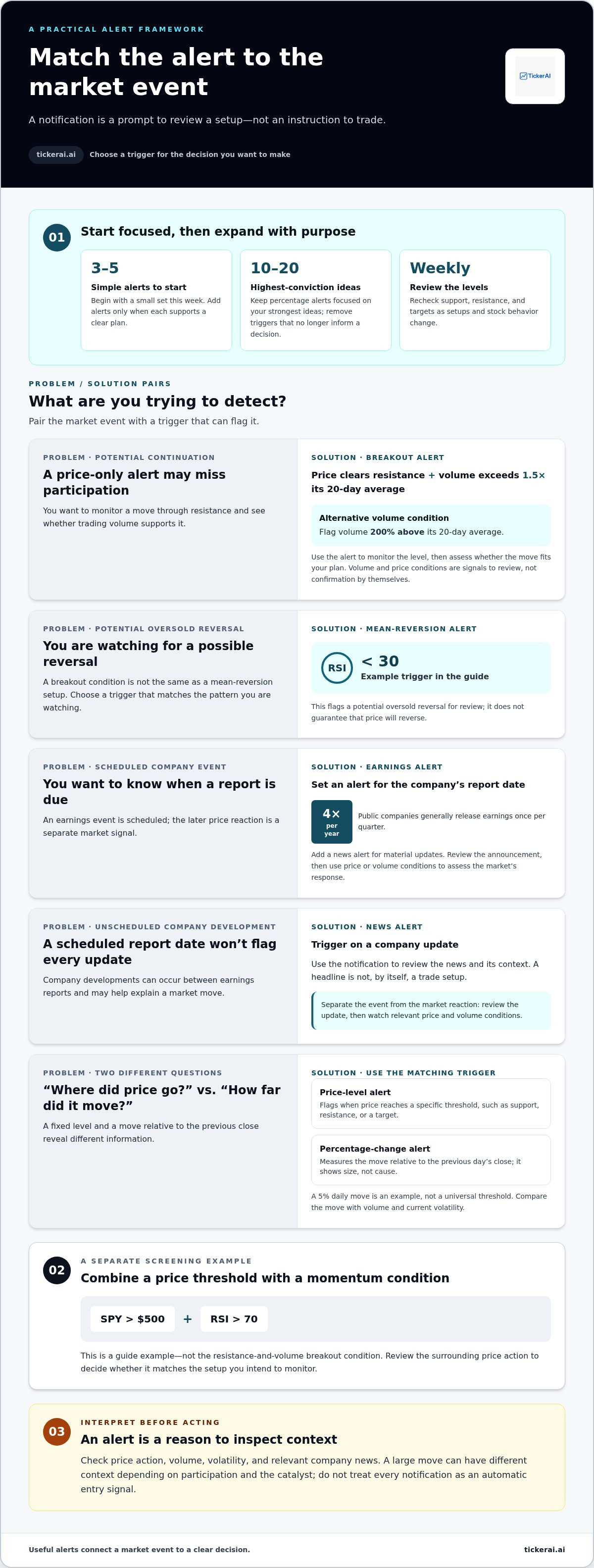
Match alerts to the setup: a breakout needs confirmation, while a mean-reversion setup looks for a potential reversal. Earnings alerts flag scheduled company reports and related news.
Breakout Alerts
A breakout alert can trigger when price clears resistance and volume exceeds 1.5 times its 20-day average. This combines price action with participation, unlike a price-only trigger. Another approach flags volume 200% above its 20-day average. Use these conditions to monitor a level, then assess whether the move fits your trade plan.
For context, a 20-day exponential moving average gives more weight to recent closing prices. A 50-day exponential moving average offers a different reference period. These indicators can help frame alerts, but they measure different windows and aren’t breakout confirmation by themselves.
Earnings Announcement Alerts
Set an earnings alert for a company’s report date, then add a news alert for material updates. Public companies generally release earnings reports four times a year, once per quarter. Unlike a breakout trigger, an earnings alert is tied to a scheduled event. It tells you when to review the report, not whether the resulting price move supports a trade.
Separate the event from the market reaction. An earnings notification can prompt you to review the announcement, while a price or volume condition can flag the market’s response. For example, monitor resistance and volume after a report rather than treating the headline alone as a setup. News alerts can flag company developments between scheduled reports.
| Alert option | Trigger | Best suited to |
|---|---|---|
| Breakout | Price above resistance with volume over 1.5 times its 20-day average | Potential continuation |
| Mean reversion | RSI below 30 | Potential oversold reversal |
| Earnings | Scheduled quarterly report | Event monitoring |
| News | Company update | Unscheduled developments |
Choose a trigger that matches the event you plan to assess, then use price and volume conditions to evaluate the market’s response.
The guide suggests an alert example for SPY when its price exceeds $500 and RSI is above 70. This pairs a price threshold with a momentum condition, unlike a breakout alert based on resistance and volume. Treat it as a separate screening signal, then review the surrounding price action to decide whether it matches the setup you intend to monitor.
Percentage-change alerts from the previous close
A percentage-change alert compares a stock or ETF’s price with the previous day’s close. It flags the size of the move, while a price-level alert marks a specific threshold.
To set useful alerts around support, resistance, and target prices, mark those levels on the chart and create a separate price trigger for each. Add a percentage threshold to track broader movement. A level alert tells you where the price reached; a percentage alert shows how far it moved from the previous close. Knowing how to use stock alerts effectively starts with matching each trigger to a decision.
Choose a threshold that fits the setup and the stock’s usual movement. A 5% move in a day is one example, not a universal trigger. Limit alerts to the top 10-20 highest-conviction ideas, and remove triggers that no longer inform a decision.
Percentage alerts show the size of a move, not its cause. Compare the change with trading volume and current volatility. A large move with elevated volume can indicate stronger participation; the same move on lighter volume may call for a different review. Treat the notification as a prompt to inspect the context, not as an automatic entry signal.
To monitor material changes, pair a price trigger with relevant company news. A sudden decline, for example, can prompt you to review whether a company update helps explain the move. This separates a market signal from a possible catalyst and gives you context for your next decision.
Review thresholds weekly against updated support, resistance, and targets. If a stock’s behavior changes, a fixed percentage may become too sensitive or too slow. Using stock alerts effectively means keeping each trigger tied to a decision and removing alerts that merely duplicate other notifications.
To combine volume, volatility, and percentage alerts, start with the percentage move, then inspect volume and recent trading behavior. A broad index ETF and a volatile individual stock may call for different thresholds.
Organize selected triggers in a watchlist-based alert workflow so each notification has a clear purpose.
Push notifications, text messages, and email alerts
The delivery method affects how an alert reaches you and when you review it. In a brokerage app or trading platform, open the alert settings, select a ticker and condition, then choose an available channel.
Push Notifications
Push notifications appear through an app on your device. They suit price or news triggers you want to notice while using other apps. For example, set a push alert for a stock crossing a marked level. Check the notification settings on your device and in the trading app, since both can affect whether alerts appear.
Use push notifications for signals that need timely review, not every watchlist update. A crowded stream can make an important price move harder to spot. Keep the app’s alert list focused on actionable conditions.
Text Message Alerts
Text alerts deliver a short notification to your phone’s messaging inbox. They can separate a trading signal from app activity, which helps if you don’t keep the platform open. For instance, send a key threshold alert by text and leave routine watchlist changes in the app.
Investment account alerts can also notify you when a deposit or trade occurs. Keep account activity messages separate from market alerts. One reports an account event; the other flags a stock condition for review.
Email Alerts
Email alerts collect notifications in your inbox rather than interrupting your screen. They work well for updates you can review alongside other information, such as company news or a watchlist summary. Use clear subject lines or inbox filters to distinguish earnings notices from price triggers.
Email may be less immediate if you check your inbox infrequently. Reserve it for alerts that benefit from written context or later review. Send high-priority triggers through a channel you monitor more closely.
To configure an alert, choose a ticker, set the price, percentage, news, or account condition, then select a delivery channel. Save the rule and review its settings when the underlying price level or watchlist changes.
Match the channel to the response you need: push for visible app notices, text for selected high-priority signals, and email for updates you’ll review in batches. Avoid sending every trigger through all three channels. Use a separate channel only when it serves a clear purpose.
Price-trigger alerts for stocks and ETFs
Price triggers notify you when a stock or ETF reaches a chosen level. Start with a few levels tied to decisions, not every price fluctuation.
Real-Time Alerts
Real-time alerts use current quote updates; delayed alerts trigger from later data. Costs depend on the platform and the market-data access attached to the account. A trigger only reports that a condition occurred. It doesn’t eliminate the risk of a false signal: a brief price move can cross a level and reverse before you review it.
Use an alert as a prompt to reassess, not an automatic trade instruction. For example, create a three-alert ladder for AAPL: $175 for an early warning, $180 for an entry level, and $185 for breakout confirmation. Each notification represents a distinct checkpoint. Review the price action and your plan before deciding what to do.
Premarket and After-Hours Alerts
Premarket and after-hours activity can move a stock outside regular trading sessions. Check whether an alert applies to extended-hours or regular-session prices. For example, an ETF may cross your threshold after the close, then open at a different price. Session settings determine which movements can trigger a notification.
Price changes outside regular hours can occur with different trading activity than during the main session, making a brief move less useful as confirmation. Set separate expectations for extended-hours signals, and review the opening price before acting on an overnight alert.
U.S. market session settings also affect alert timing. A trigger limited to regular trading may not notify you of a premarket or after-hours crossing. Check the selected session when creating an alert, then compare the notification’s timestamp with the price chart before interpreting the move.
For broader context, add a 52-week high or low alert to a stock or ETF watchlist. Review price levels weekly as support and resistance change. Keep only alerts linked to a defined decision, and use stock price alert tools to organize those triggers around your watchlist.
TickerAI: AI Stock Opportunity Discovery
TickerAI offers AI Stock Opportunity Discovery, curated Swing Trade Setups, Smart Watchlist & Alerts, and Long-Term Investment Ideas to support a defined alert workflow. Use these tools to identify potential opportunities and organize tickers for further review, rather than building every watchlist signal manually.
Use alerts to monitor levels and market conditions, and use TickerAI’s discovery and setup tools to surface ideas for your own analysis. Long-term investors can explore investment ideas, while active traders can review swing trade setups. Alerts support monitoring, but they don’t replace your judgment about risk, timing, or whether a setup fits your strategy.
Explore TickerAI at tickerai.ai to learn more.
Make Your Next Alert Actionable
A useful alert starts with a decision you’ve already defined. Before adding another trigger, decide what you’ll review when it fires and what evidence would change your view. This turns notifications into checkpoints, not commands.
To use stock alerts effectively, review them after each meaningful market move. Keep conditions that focus your attention; remove those that create noise or no longer match your plan. Over time, this builds a more deliberate monitoring routine without requiring constant screen time.
Explore TickerAI’s stock tools to organize market ideas and alerts. Use them to support your own research and decision-making, evaluating each signal against your objectives and approach to risk.
Explore TickerAI’s stock alerts and take the next step toward a more focused watchlist. Your process gets stronger with each intentional review.
Frequently Asked Questions
What types of stock alerts are available, and how do price, volume, and news alerts differ?
Stock alerts can monitor price levels, trading volume, percentage moves, technical conditions, earnings, and company news. For example, use a price alert to flag a ticker reaching a planned level, a volume alert to identify unusual activity, and a news alert to surface a possible catalyst. When several alerts trigger together, review the event and chart before deciding whether the information changes your plan.


