

More alerts don’t automatically make a service a better fit. The best way to use a stock alert service is to match its alert frequency, risk controls, and trade volume to your trading style. Some services send 10 or more alerts per day, so the right cadence matters as much as the signal itself.
Fast-moving alerts can help active traders monitor setups, while a lower-volume approach may suit investors who hold positions longer. In either case, treat alerts as inputs to your decisions, not as a substitute for a plan.
This guide compares alert-service options for different trading styles, from frequent short-term signals to longer-term ideas. You’ll learn what to assess, how alert volume can affect your workflow, and how to choose a service that fits the time and risk you’re prepared to manage.
Key Takeaways
- Set a risk limit before acting on an alert, then define your exit and profit-taking criteria in advance.
- Match alert format and holding period to your approach, whether you trade short-term moves or seek longer-term ideas.
- Choose a signal volume you can review and act on consistently; filter out alerts that don’t fit your plan.
- Assess performance claims carefully by looking beyond win rates to average wins, losses, and how results were recorded.
Risk management, stop losses, and profit targets
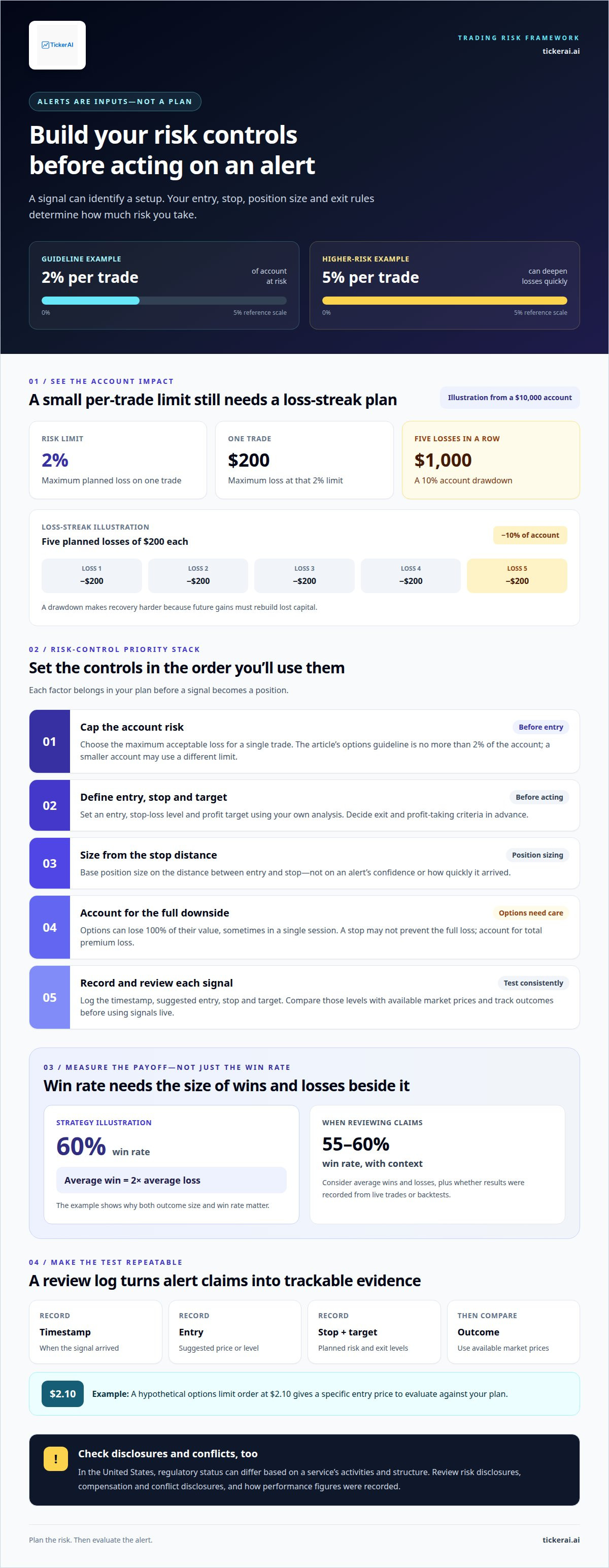
Trading alerts identify setups; they don’t set your account’s risk. Before acting, define an entry, a stop-loss level, and a profit target based on your own analysis. For options traders, one guideline is to risk no more than 2% of the account on a single trade. A smaller account may use a different limit, but increasing risk to 5% can deepen losses quickly.
For example, a $10,000 account at a 2% risk limit allows a maximum loss of $200 on one trade. Five consecutive losses at that amount would cost $1,000, or 10% of the account. That drawdown can make recovery harder because future gains must rebuild the lost capital. Size each position using the distance between entry and stop, not the alert’s confidence or notification speed.
Set profit targets before entry, then compare potential gains with the planned loss. A strategy with a 60% win rate and average wins twice the average loss illustrates why both measures matter. A 55-60% win rate is more informative alongside average wins and losses. Options can lose 100% of their value, sometimes in a single session, so a stop may not prevent the full loss.
In the United States, stock-alert services can have different regulatory statuses depending on their activities and structure. Review risk disclosures, compensation and conflict disclosures, and whether performance figures reflect live trades or backtests.
To test alerts, record each signal’s timestamp, suggested entry, stop, and target in a review log. Compare those levels with available market prices, then track outcomes consistently before using the signals in live trading. For an options alert, a hypothetical limit order at $2.10 gives a specific entry price to evaluate against the plan.
| Risk approach | Best fit | Key control |
|---|---|---|
| Fixed account percentage | Consistent sizing | Cap risk per trade |
| Stop-based position sizing | Price-level setups | Size from entry to stop |
| Profit-target planning | Defined exits | Set target before entry |
| Loss-streak limit | Drawdown control | Track cumulative losses |
| Options premium limit | Long options | Account for total premium loss |
| Alert review log | Testing signals | Record outcomes consistently |
Choose an approach that fits your position type, stop distance, and maximum acceptable account loss.
Choosing alerts for different investing styles
The best way to use a stock alert service is to match its signals to your holding period. An active trader watching a breakout needs alerts tied to price action and entry conditions. A long-term investor may prefer updates about company developments that could affect an investment thesis. For example, track catalysts that would prompt a review instead of every daily price fluctuation.
Consider how much context you need to assess a signal. For swing trading, the best way to use a stock alert service may be to focus on setups with a stated timeframe and technical context. Beginners may find alerts more useful when they explain the pattern or catalyst, rather than simply naming a ticker. Review your alerts weekly and remove signals that no longer fit your approach.
Options alerts need contract details. Check the underlying ticker, strike, and expiration together, because each affects the position. The best way to use a stock alert service for options is to compare those details with your intended holding period and existing plan. A directional alert such as “bullish” doesn’t explain the contract or provide a reason to trade.
Choose delivery based on how you process information. Text notifications can surface time-sensitive alerts on your mobile device; email can keep research and trade context together for later review. If frequent prompts interrupt your analysis, reserve texts for alerts you may act on promptly and review routine updates by email. Control over what reaches you matters more than adding another channel.
- Short-term trading: Prioritize timely price or setup changes.
- Swing trading: Look for defined setups and a compatible holding period.
- Long-term investing: Focus on watchlist updates tied to your thesis.
- Options trading: Review strike, expiration, and underlying ticker together.
Choose alerts that fit your schedule and decision process. To organize signals around your investing focus, explore stock watchlist and alert tools.
Alert frequency and trade volume
The best way to use a stock alert service is to choose a cadence you can review without rushing. Frequent signals can divide your attention among unrelated tickers and setups. Before enabling alerts, decide how much time you can give each notification and which conditions deserve closer attention. This filters out prompts that don’t support your trading plan.
Trade volume and alert volume aren’t the same. You may receive several signals without acting on any if they fail your plan’s criteria. Review each alert against the ticker’s current chart, the setup logic, and your intended holding period. Record why you acted or passed. This lets you compare signals received with positions actually opened.
To find the best way to use a stock alert service, compare its alert pace with your routine. If you have limited screen time, prioritize alerts for a defined chart pattern and review less urgent updates later. Options traders can keep contract-related notifications separate from stock alerts to assess each signal in context. A custom watchlist can also narrow alerts to tickers relevant to your strategy.
- Frequent alerts: Filter by ticker and setup before reviewing.
- Low-action alert streams: Revisit whether current filters match your plan.
- Multiple strategies: Separate alerts by setup type or watchlist.
The best way to use a stock alert service also depends on having a repeatable review process. Check your journal regularly for patterns in ignored alerts, acted-on setups, and time spent reviewing. Adjust filters if the stream consistently distracts from analysis. Match the alert cadence to the attention each position requires, rather than treating every notification as a new trading decision.
What are the risks of stock alert services, including misleading alerts, scams, and conflicts of interest?
A stock alert is a prompt to investigate, not proof that a trade is sound. A signal may arrive after a price move, rely on incomplete context, or no longer fit market conditions. For example, a bullish alert may omit the catalyst or invalidation level. Compare its entry and reasoning with current market information before deciding whether it fits your plan.
Performance claims need context. An advertised 150% annual return may come from backtested results rather than live trading. Backtests can use assumptions that differ from actual execution, including timing and available prices. Look for clear distinctions between simulated and real results, plus the period covered, losing trades, and average gains and losses. A win rate alone cannot show how a strategy performs overall.
Conflicts of interest can affect how a signal is presented. A service may have a financial relationship connected to a security or promotion. Read disclosures about compensation, ownership, and other relationships, then consider whether the alert explains its reasoning. A ticker recommendation without supporting analysis gives you less basis for independent review.
Warning signs of a scam include pressure to act immediately, guaranteed-profit claims, and demands to follow signals without understanding them. Treat urgent messages requesting account credentials or payment through unusual channels as serious red flags. Keep brokerage login details private, and don’t let a notification override your risk limits.
- Check the record: Separate live results from backtests and review losses.
- Inspect the signal: Note its timestamp, entry logic, and exit criteria.
- Review incentives: Look for compensation or ownership disclosures.
- Pause under pressure: Reject guaranteed-return language and rushed decisions.
Use those checks before adding any signal to your trading process. To compare alerts with your own analysis, explore stock opportunity analysis.
TickerAI: AI Stock Opportunity Discovery
TickerAI offers AI Stock Opportunity Discovery for traders seeking market opportunities to research. Its Swing Trade Setups can support shorter-term trading, while Smart Watchlist & Alerts help organize tickers and monitor relevant market movements. For a longer horizon, Long-Term Investment Ideas offer another starting point for research. These tools connect opportunity discovery with the investing style and review process you’ve defined.
Turn to TickerAI when you want stock ideas and alerts gathered around your trading or investing focus. Use each signal as an input to your own research and risk plan, not as an automatic instruction to trade. Visit tickerai.ai to explore TickerAI.
Turn your alert process into a consistent workflow
The best way to use a stock alert service is to make it part of a repeatable decision process, not a substitute for one. Decide what information deserves your attention, how it fits your investing horizon, and what you’ll do after receiving a signal. A clear workflow keeps each alert connected to your objectives instead of market noise.
For a structured source of ideas, TickerAI offers AI Stock Opportunity Discovery, Swing Trade Setups, and Smart Watchlist & Alerts. Use these tools to surface opportunities and organize signals for your own analysis and decisions.
If you’re ready to explore an alert workflow that fits your trading style, contact TickerAI to discuss your alert needs. Take the next step with a process that keeps your attention focused and your decisions deliberate.
Frequently Asked Questions
How do stock alert services work, and what types of alerts can they send?
Stock alert services monitor market data or news for specified conditions and send a notification when a trigger occurs. A price alert might flag a ticker crossing a level you set; a news alert may surface a company announcement. Other common categories include percentage moves, trading volume, and technical indicators. An alert reports that a condition occurred, not that a trade was completed or that you should act.
What features should you look for when choosing a stock alert service?
Prioritize controls that make alerts clear and manageable: timestamps, the ticker and trigger condition, adjustable notification preferences, and a way to review earlier alerts. If a signal cites a technical pattern or news event, its explanation should provide enough context for you to investigate. For example, a price threshold is harder to assess without the triggering price or time than with a timestamped notification.
How do you set up price, percentage-change, volume, and news alerts?
Choose the ticker first, then select a condition that matches your decision. Set a price alert around a level you’re monitoring; use a percentage-change alert to flag a move relative to the stock’s price. For volume, define the activity condition available in the service. For news, select company or event categories relevant to your research. Review each trigger before enabling notifications.
How should you choose alert thresholds and avoid too many notifications?
Base thresholds on what would change your next decision, not on arbitrary levels. For example, set a price trigger near a level that would prompt you to reassess a company, rather than at every small fluctuation. Apply separate rules to different tickers because their usual price behavior varies. Remove alerts you routinely ignore, and avoid overlapping conditions that notify you about the same move.
How can you use stock alerts to support a trading or investing plan without treating them as buy or sell signals?
Use an alert as a prompt to revisit your plan and check whether anything material has changed. If a holding triggers a news notification, compare the announcement with the assumptions behind your investment thesis. For a prospective trade, review your entry criteria and available market information before deciding. Record why you acted or passed so later reviews show whether alerts are helping your process.
How reliable and timely are stock alerts, and can prices move before an alert arrives?
Alert timing depends on how quickly the service receives and processes relevant data and how the notification reaches your device. A price can move before an alert arrives or before you read it, especially during a fast market move. Treat the displayed trigger as a time-sensitive observation, then compare it with current market conditions before making a decision.


